Most security teams find out about an intrusion the same way: an alert fires. The trouble is when it fires. By the time encryption starts or a large file transfer trips a threshold, the attacker has usually been inside for days. They signed in with a real account, moved between machines with ordinary tools, and looked around. Each of those steps left evidence. None of it was loud enough to alert on.
Threat hunting is the practice of going after those quiet steps on purpose. It is not a faster way to triage alerts, and it is not running every query in a library once a quarter. A hunt is an investigation that starts from a question about how an attacker would behave in your environment, and ends with something you keep.
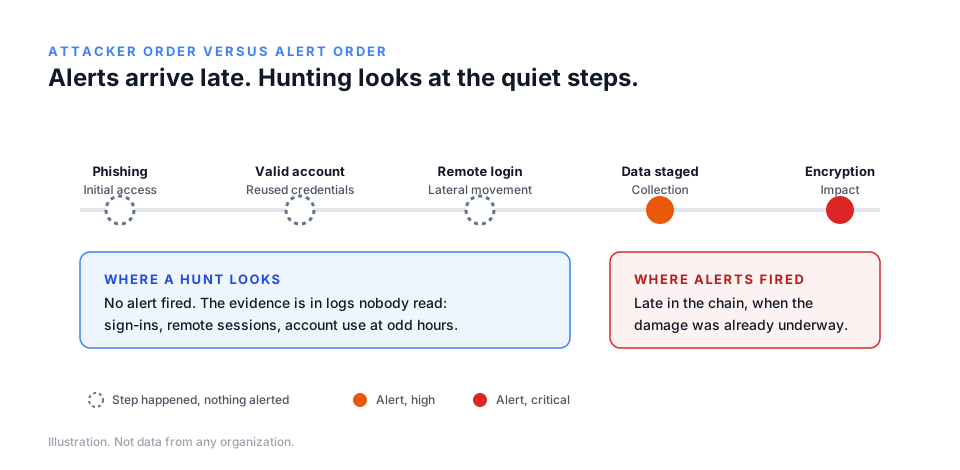
Alerts tell you what you already knew to look for
Every alert rule is a past lesson written down. It encodes behavior someone has seen before and decided was worth a page at two in the morning. That makes alerts essential and also limited: they cover what is known, noisy enough to notice, and cheap enough to watch all the time.
Attackers know this too. The steps that matter most early in an intrusion, such as signing in with stolen credentials, using built-in administration tools, or reading a file share, look almost exactly like a busy employee. An alert tuned to catch them would fire all day. So nobody writes it, and those steps go unexamined.
When we run tabletop exercises, we see the same pattern from the other side. A team receives injects in the order they would detect events, not the order the attacker performed them. The first signal is rarely the first step. The debrief question that teaches the most is simple: what happened before we noticed, and where would it have shown? That question is a hunt.
Write the hypothesis before you open a search box
The most common reason a hunt goes nowhere is that it starts with a query instead of a question. Someone opens the log platform, searches for something that sounds suspicious, gets ten thousand results, and closes the tab. Nothing is learned and nothing is kept.
A useful hypothesis answers four things before anyone searches.
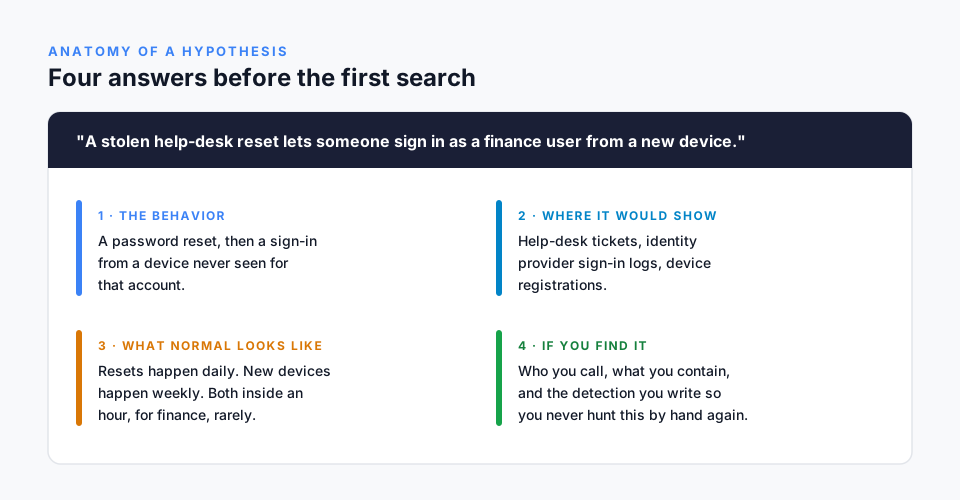
- The behavior. Describe what the attacker would do in plain words, specific to how your organization works. "A stolen help-desk reset lets someone sign in as a finance user from a new device" is a hypothesis. "Look for bad sign-ins" is not.
- Where it would show. Name the data that would contain the evidence: help-desk tickets, identity provider sign-in records, device registrations, remote session logs. If you do not collect that data, you have already learned something worth writing down.
- What normal looks like. Most hunts fail at this step. Password resets happen every day; new devices appear every week. The signal is the combination, for a particular group, inside a particular window. Without a baseline you cannot tell an attacker from a Tuesday.
- What you will do if you find it. Decide in advance who you call, what you contain, and what detection you will write. A hunt that finds something and has no plan becomes an incident with a delay built in.
Good hypotheses come from three places: how attackers who target your sector have behaved recently, the gaps your own exercises and incidents exposed, and changes in your environment, such as a new remote access tool, a merger, or a help desk moving to a new provider.
Choose the data first, then the query
Once the hypothesis is written, the next decision is not which query to run but which sources to trust. An hour spent confirming that sign-in logs cover every application, that remote session records include the source machine, and that time stamps line up across systems will save a day of chasing results that do not mean what they appear to.
This step also produces findings on its own. Many hunts end with "we could not answer the question because the data does not exist." That is a real result. It belongs in the same place as any other finding, with an owner and a date, because the next attacker will rely on the same blind spot.
Decide what you found, honestly
Every hunt ends in one of three places:
- Found. Evidence of the behavior, malicious or not. Malicious goes to incident response; benign but surprising goes to the owner of the system.
- Not found, with confidence. The data was complete, the baseline was clear, and the behavior is not there. Write down what you looked at and for how long, so the result can be trusted later.
- Cannot tell. The data was missing, the baseline unclear, or the time ran out. This is not failure. It is a finding about your visibility, and often the most valuable one.
The discipline is to record which of the three it was. "We looked and found nothing" with no record of what was looked at is the same as not looking.
Keep what each hunt teaches
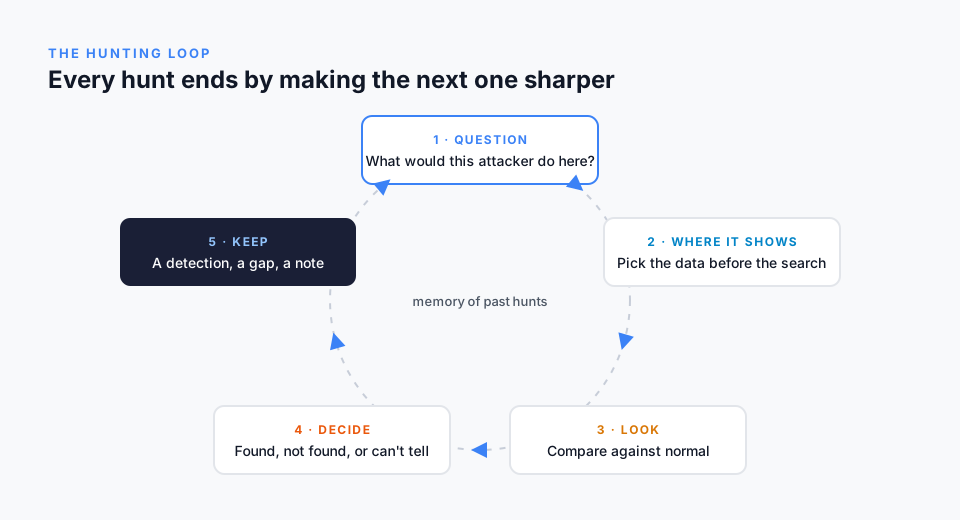
The part of hunting most teams skip is the part that makes it compound. Each hunt should leave at least one of these behind:
- A detection. If the behavior can be described precisely enough to find by hand, it can usually be found automatically. The goal is to never hunt the same thing manually twice.
- A visibility gap, with an owner and a date to close it.
- A baseline that the next hunter does not have to rebuild: how many resets per day, which groups use remote sessions, what normal transfer volumes look like.
- A note in the organization's memory: the hypothesis, what was searched, what was found, and what changed as a result. Six months later, someone will ask whether this was ever checked. The answer should take seconds.
Over time, that memory becomes a map of what the organization has examined and what it has not. It also shows maturity in a way leadership and auditors understand: not how many hunts ran, but how many questions were answered, how many detections came out of them, and how many blind spots were closed.
Hunting and exercising are the same loop
Tabletop exercises and threat hunts look like different activities, but they feed each other. An exercise shows a team where its detection and decisions break down under pressure; each of those gaps is a hypothesis waiting to be hunted. A hunt that finds a blind spot is a scenario waiting to be exercised: what would we do if this had been real, and would we have noticed in time?
Teams that run both, and keep the results in one place, stop treating readiness as an annual event. They build it a question at a time.
We are building MetisHunter around this loop: hypothesis first, data before queries, an honest result, and a memory that makes the next hunt sharper. It is in development. If you would like to hear when it is ready, or to see how MetisForge exercises surface the questions worth hunting, get in touch.